Dreamville RP Controls
Phone menu, interact, drive, and first person — mapped for gamepad, keyboard, and touch.
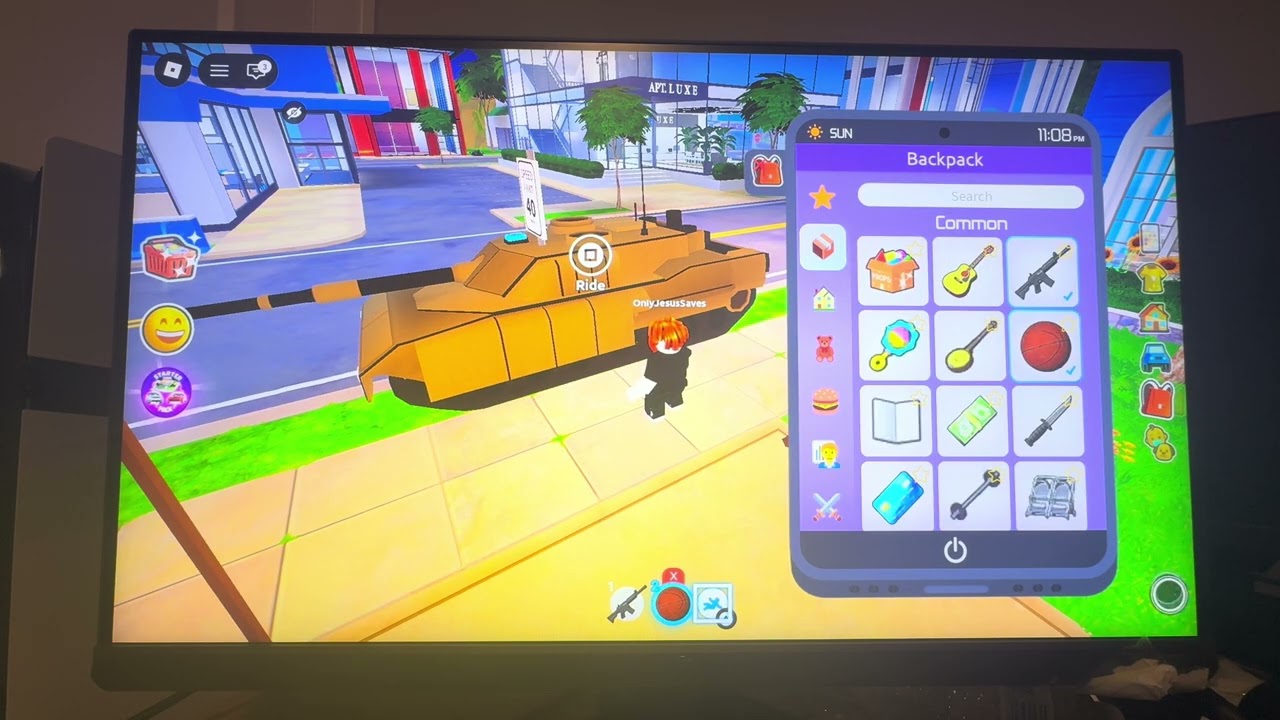
Dreamville RP uses Roblox’s default movement plus a custom phone-style menu for houses, cars, avatar, and companions. If a button does nothing, you are probably one layer too deep in that phone overlay rather than in the world. This page maps the controls players actually search: console first (the video below is a PS4/PS5 walkthrough), then PC and mobile. Pair it with Getting Started so the tutorial and this list agree.
The video sits in the middle on purpose. It is short. Watch the touchpad open the shop/phone, square on a prop, and R2 on a vehicle, then come back to the tables.
Console (PlayStation / Xbox)
From the recorded PS4/PS5 tutorial:
- Right stick click — first-person toggle. Click again or zoom out for third person.
- Options / menu button — text chat at the top and Roblox settings. Turn chat on if your family scene needs typing.
- Square (PlayStation) / X (Xbox) — interact. Benches, doors, counters, and enter vehicle all sit on this button.
- Touchpad (PlayStation) — cursor on the 2D phone overlay: shop, avatar (including baby/child), name, bio, role, houses, spawn car, backpack, companion/kid spawn, emotes.
- R1 — cycle equipped inventory.
- R2 — use the equipped item (throw a ball, fire a tool) and drive once you are in a vehicle.
Xbox maps the same actions onto the equivalent face button, bumpers, and the view/select button for the overlay. If the overlay cursor is stuck, press the view button again to drop back into the world.
Console cannot run the loadstrings on the scripts hub. Play the free milestone content instead.
PC (keyboard and mouse)
- WASD — move. Space jump, Shift sprint if enabled in Roblox settings.
- E or click prompts — interact with world objects (Roblox default may vary with keyboard binds).
- Click the on-screen phone / HUD icons — same overlay as console: houses, vehicles, avatar, companions. The right-side icon stack in screenshots on this wiki is that HUD.
- Click a vehicle seat, then WASD — drive. Mouse looks.
- Shift-lock (if you use it) helps camera while walking a house interior.
A mouse makes the avatar editor and house list faster than a stick. That is the only real PC advantage. The systems are identical.
Mobile
- On-screen joystick to move.
- Tap the interact prompt when it appears on a door, NPC, or vehicle.
- Tap HUD icons on the right/left edges for the phone menu.
- Driving uses the mobile vehicle overlay after you tap into the car.
Keep HUD scale readable. Family scenes with three kids plus a pet will cover small phones in icons — park the extras before you open the house list.
Menu map (every platform)
Whatever input you use, the phone contains:
- Avatar — outfit, age (adult/child/baby), name, bio, role. See roles.
- Houses — spawn a layout you own. See houses.
- Vehicles — garage, including milestone cars and pack cars. See vehicles.
- Companions — kids and pets. See family and pets.
- Shop — passes. See passes hub. There is no codes tab. Status: codes.
- Backpack / gear — held items, emotes, toys.
If a friend cannot open your house, they are on another server, not missing a bind. Join from the Roblox friends list.
Driving and first person together
First person is nice in interiors and awkward on a motorcycle. Toggle it off before you spawn the Police Motorcycle or a boat. Boats from the Beach Update use the same enter/drive pattern near water on the map. Jetpack (pass) is a hold-to-fly control on top of movement; it is not a substitute for the garage.
When controls “break”
After a patch (last public card update 23 November 2026), HUD icons can shift. Rejoin. If interact does nothing, you may still have the phone cursor captured — close the overlay. If chat is missing on console, Options → enable text chat. Roblox itself can disable chat in some account settings; that is not a Dreamville RP bug.
Learn two binds: open phone and interact. Everything else in this town is those two plus drive. Then go back to playing a scene instead of opening this page every time you sit on a bench.
Frequently Asked Questions
Quick answers players search before they join a Dreamville server.
How do I open the house menu on PS5?
Use the touchpad to move a cursor on the on-screen phone overlay, then select houses. Square interacts with the world, not the overlay.
How do I drive in Dreamville RP?
Enter the vehicle (square on PlayStation, tap/click on other devices) then use R2 on console or WASD/joystick on PC and mobile.
How do I go first person?
Click the right stick on console. On PC, zoom in with the mouse wheel or the Roblox camera control until first person.
Where is the codes button?
There is not one. The overlay has avatar, houses, vehicles, companions, and shop. See the codes hub.
Can I use keyboard on console?
Roblox allows a keyboard and mouse on some consoles. It makes the phone overlay easier. It is optional — the gamepad map on this page is enough.